
Gadgets Oman
24 people viewing

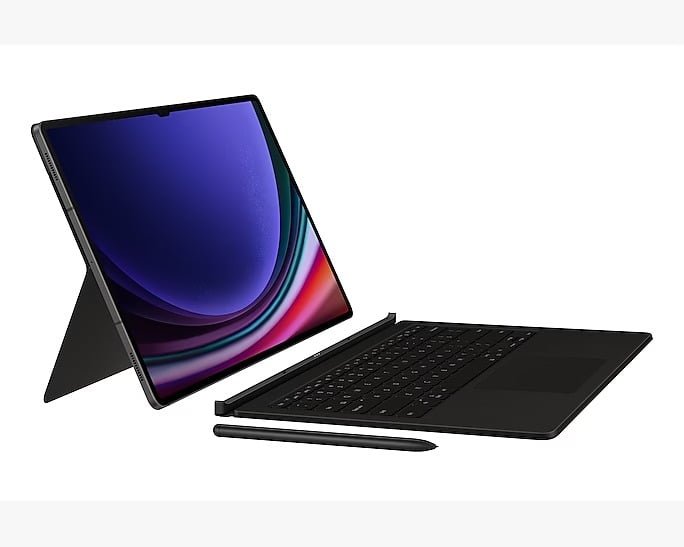
Samsung Galaxy Tab S9 Ultra Book Cover Keyboard Black Ef-Dx915Ubegae

Model: 29623 | SKU:
0 Customer Reviews
Recommended
125

PC-like experience with a single tap
Magnetically attachable for easy replacement
Effortless comes in 150°

Frequently Bought Together

Bundle Price

Gadgets Oman
SOLD BY Gadgets Oman
4.9
99% Positive
Verified Authentic
100%
Trusted Local Hero
20+ Yrs
Customer Satisfaction
99%
This item is not eligible for return
Secure Payments
INCLUSIVE OF VAT Credit Cards accepted
!
Hurry, Almost Sold Out! Only units left.
In stock & ready to ship
Available on Backorder
Out of Stock

Notify me when available

You're on the list!

We'll alert you the second it returns.

Check Store Availability

Title: Enhance Your Samsung Galaxy Tab S9 Experience with the Ultra Book Cover Keyboard

Description:

Elevate your productivity and protect your Samsung Galaxy Tab S9 with the Samsung Ultra Book Cover Keyboard in sleek black (EF-DX915UBEGAE). Designed specifically for the Samsung Galaxy Tab S9, this premium accessory combines style, functionality, and versatility to optimize your tablet experience.

Experience effortless typing and seamless functionality with the built-in keyboard of the Ultra Book Cover. Featuring a full-sized keyboard layout with well-spaced keys and comfortable key travel, typing emails, documents, and messages becomes a breeze. The integrated touchpad allows for precise cursor control, eliminating the need for an external mouse.

Enhance your viewing experience with the adjustable stand function of the Ultra Book Cover. Whether you're typing, watching movies, or video conferencing, the adjustable stand offers multiple viewing angles for optimal comfort and convenience. From tabletop mode for typing to media mode for entertainment, find the perfect angle to suit your needs.

Crafted from high-quality materials, the Ultra Book Cover provides durable protection for your Samsung Galaxy Tab S9 against scratches, bumps, and spills. The slim and lightweight design maintains the sleek profile of your tablet while offering added protection during daily use and travel.

Experience seamless connectivity and enhanced functionality with the Samsung Ultra Book Cover. Designed to complement the Samsung Galaxy Tab S9, this premium accessory combines style, durability, and functionality to enhance your tablet experience.

Key Features:

  • Full-sized keyboard layout for effortless typing.
  • Integrated touchpad for precise cursor control.
  • Adjustable stand with multiple viewing angles.
  • Durable construction for protection against scratches and bumps.
  • Slim and lightweight design for portability and convenience.

Transform your Samsung Galaxy Tab S9 into a versatile productivity tool with the Samsung Ultra Book Cover Keyboard. Whether you're typing emails, watching videos, or browsing the web, this premium accessory offers enhanced functionality and protection to elevate your tablet experience.

PC-like experience with a single tap

A man is using a Galaxy Tab S9 Ultra with his hand on the keyboard of a Book Cover Keyboard.

Get things done easily with the Book Cover Keyboard. Fully backlit with function keys and a trackpad, the keyboard combines with DeX mode to deliver a PC-like experience with a single tap. You can even assign app shortcuts for quick and easy access.

* Image simulated for illustrative purposes. Actual UX/UI may vary.
** Compatible with Samsung Galaxy Tab S9, S9+, S9 Ultra. Galaxy Tab S9, S9+, S9 Ultra Book Cover Keyboard can connect to up to 3 devices via Bluetooth.
*** Backlight available only on Galaxy Tab S9 Ultra Book Cover Keyboard by pressing Fn + F12.
**** Features and keyboard layout may vary by model or type of language.
***** App shortcuts can be assigned for selected apps only.

A front view of the keyboard with function keys highlighted. A key and the trackpad are also highlighted to underscore their large size.

Magnetically attachable for easy replacement

With its magnetic design, you can easily attach and detach the back cover to personalize your device. Replace it according to your preference to fit your everyday needs.

A layout of several Galaxy Tab S9 Ultra accessories, including a Book Cover Keyboard, Privacy Screen, NotePaper Screen, two Smart Book Covers and an S Pen placed beside Galaxy Tab S9 Ultra.

* Products sold separately.

Effortless comes in 150°

Take it all the way back to 150° for a new level of freedom with the Book Cover Keyboard. Adjust the angle on the back easily to find your perfect position to send emails, blog, study — you name it.

A person is pointing S Pen at a Galaxy Tab S9 Ultra with a web browser shown onscreen, propped up horizontally at an angle using the Book Cover Keyboard. A top view of a person using the trackpad on the Book Cover Keyboard to navigate the Samsung Notes app on Galaxy Tab S9 Ultra.

* Image simulated for illustrative purposes. Actual UX/UI may vary.

Enhance your productivity with wireless sharing

With Wireless Keyboard Sharing, you can easily connect to your other Galaxy devices and smoothly type or navigate on them. Switch between devices with ease and take control of your phone as you would on your tablet.

A person is using Galaxy Tab S9 Ultra with the Book Cover Keyboard. Its screen is divided into two windows with several image results of home furniture on the web and one of the images being edited. A Galaxy smartphone with the image on the screen while letters are being typed with the cover's keyboard. Bluetooth logo is shown.

* Products sold separately.
** Image simulated for illustrative purposes. Actual UX/UI may vary.
*** Wireless Keyboard Sharing is supported on Galaxy smartphones running One UI 3.1 or above and Galaxy Tab devices running One UI 2.5 or above, connected to the Book Cover Keyboard via POGO.
**** To enable Wireless Keyboard Sharing, both devices must be logged in to the same Samsung account. Performance may vary depending on user network environment.
***** Up to 3 devices can be registered for Wireless Keyboard Sharing.
****** Wireless Keyboard Sharing can be turned on/off in Settings > General Management > Physical Keyboard > Wireless Keyboard Sharing.

Brand Samsung
Model Number 29623

Write a Review

Please log in to share your experience with this product.

Log In / Register

Customer Reviews

No Reviews Yet

Be the first to share your thoughts on this product!

You May Also Like

Samsung

DUX DUCIS SAMSUNG TAB S6 LITE DOMO SERIES CASE BLACK DOMO120
0
(0)
5.00
8.00 38% OFF
icon 100% Authentic
icon Only 2 left!
icon #46 in Cases & Cove...
icon 70 viewing now

Samsung

DUXDUCIS SAMSUNG GALAXY TABS9 ULTRA TOBY CASE BLACK TOBY-0173
0
(0)
6.90
10.80 36% OFF
icon 100% Authentic
icon Only 1 left!
icon #8 in Tablet Cases...
icon 18 viewing now
Out of Stock
SAMSUNG GALAXY TAB A11+ 6GB 128GB GRAY SM-X230

Samsung

SAMSUNG GALAXY TAB A11+ 6GB 128GB GRAY SM-X230
0
(0)
80.90
82.90 2% OFF
icon 100% Authentic
icon #22 in Tablets
icon 76 viewing now
icon 1223+ sold recently
Out of Stock
SAMSUNG GALAXY A25 5G A256E/DSN

Samsung

SAMSUNG GALAXY A25 5G A256E/DSN
0
(0)
64.90
66.90 3% OFF
icon 100% Authentic
icon #30 in Smartphones
icon 26 viewing now
icon 1977+ sold recently
Out of Stock
SAMSUNG GALAXY S25 5G 12GB 256GB PINKGOLD SM-S931B

Samsung

SAMSUNG GALAXY S25 5G 12GB 256GB PINKGOLD SM-S931B
0
(0)
273.90
277.90 1% OFF
icon 100% Authentic
icon #17 in Smartphones
icon 31 viewing now
icon 108+ sold recently

Samsung

SAMSUNG G9 G952 49 INCH ODYSSEY OLED SMART DUAL QHD 240HZ 0.03MS GAMING MONITOR LS49DG952SMXUE
0
(0)
433.00
436.00 1% OFF
icon 100% Authentic
icon Only 1 left!
icon #22 in Monitors
icon 20 viewing now
Total Price
125
Home Shop Cart Wishlist Profile